Thursday, 26 July 2018

Dr.Fone Unlock: Fix "iPad is Disabled"


Dr.Fone Unlock: Fix "iPad is Disabled"

Dr.Fone - Unlock for iPhone and iPad is a great tool to unlock your disabled iPad, it allows you to easily remove passcodes when you forget the passcode on your iPad or you just don't know the passcode on an iPad you were given. You can use this iPad unlocker to get rid of the lost or forgotten passcode in 5 minutes.
Dr.Fone’s Key Features:


It is easy to use and requires little or no technical knowledge at all.


It is 100% secure. Only you possess access to your account and by extension, your data.


The presence of Safe Removal means you can clear your iPad and not worry about someone else stumbling upon it.
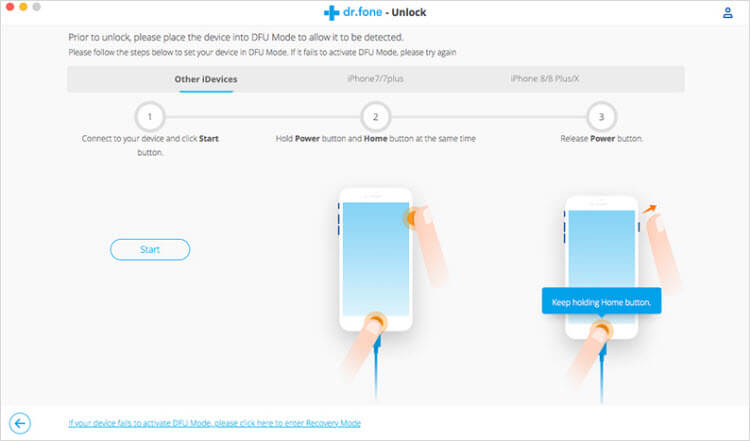


Before unlocking on Dr.Fone, you need to know this: the Find My iPad option should be disabled. Then you can successfully unlock your iPad.

The loss of your passcode is not the end for your iPad, there are ways to re-access your iPad and be back among the good times. You have options that will ensure your device is back running in no time.If you lost videos from iOS Camerall Roll which are nowhere to download again, you can use Gihosoft iPhone Data Recovery to get back deleted videos from iOS device including iPhone, iPad and iPod Touch.

Jihosoft iPhone Backup Extractor Extract and recover all types of data from iPhone backup files, such as camera roll photos, videos, SMS, contacts, reminders, WhatsApp, and etc.

Gihosoft Android data recovery Free is a super awesome software specialized in Android file recovery. With this program, you are able to recover deleted photos, music, videos, messages, contacts, call logs, WhatsApp messages, Viber chat history and more from Samsung, Huawei, LG, HTC, Motorola, Google, Oneplus, Sony, Lenovo, ZTE and other Android devices directly. Meanwhile, this Android data recovery software is available for both Windows and Mac platforms.


How to Download All Photos from iCloud

Download All Photos from iCloud

How to Download All Photos from iCloud

Download Photos from iCloud to PC

You can download multiple photos from iCloud using this iCloud app on your computer. To begin the process, you will have to download the iCloud application for Windows and install the same. After that, proceed with the following steps as stated below:


Step 1: Launch the program, and from the control panel, sign in with your Apple ID.


Step 2: From the right side of the program, you will view the services offered. You can click the Photos service and press the "Apply" button.


Step 3: Press the Options button after setting the iCloud Photo Library.


Step 4: You can now browse the pictures available in the account. Select desired images or all, and download all your iCloud photos to computer.


Download Photos from iCloud to Mac

Downloading photos to Mac from iCloud can also be completed with similar steps and you can follow them:


Step 1: You have to check whether you are running the latest version of Mac. For this, navigate to the Apple menu and choose "About this Mac" and click "Software Update."


Step 2: Head to the system preferences from the Apple menu after updating the software. Choose iCloud and log in by entering your Apple ID and password.


Step 3: After completing the signing in process, select the Photos service from the left pane.


Step 4: Now, click on the "Options" buttons provided next to the Photos feature to activate the iCloud Photo Library.


Step 5: With the action, you are allowing iCloud to synchronize all the photos on the photos library with Mac. You can now check all the pictures directly.


If you lost videos from iOS Camerall Roll which are nowhere to download again, you can use Gihosoft iPhone Data Recovery to get back deleted videos from iOS device including iPhone, iPad and iPod Touch.

Jihosoft iPhone Backup Extractor Extract and recover all types of data from iPhone backup files, such as camera roll photos, videos, SMS, contacts, reminders, WhatsApp, and etc.

Gihosoft Android data recovery Free is a super awesome software specialized in Android file recovery. With this program, you are able to recover deleted photos, music, videos, messages, contacts, call logs, WhatsApp messages, Viber chat history and more from Samsung, Huawei, LG, HTC, Motorola, Google, Oneplus, Sony, Lenovo, ZTE and other Android devices directly. Meanwhile, this Android data recovery software is available for both Windows and Mac platforms.

Thursday, 19 July 2018

How to fix Fix all Pokémon Go Error on GPS, Server, Crashing app: Other Problems


How to fix Fix all Pokémon Go Error on GPS, Server, Crashing app: Other Problems

Can’t connect to the Pokémon Go server from iPhone

Find Pokémon and Catch is most important and tucker physical activity in whole Pokémon Go, So Use other apps that decrease some burden to you and server as well.
Also, check server status for your regions at other sources (Online website). This page gives the option to report your problem related to server connectivity (Fully Down for all, unstable or Down for you only).

GPS signal not found: Start Pokémon Go game on iPhone

Location base game, First need your GPS location. Make sure and check your Pokémon Go running on iPhone/ iPad after enabled location service. If not then turn on Location service for an app installed on a device or for Pokémon go only.
Go to the Settings > Privacy > Location Services > Enable
Enable location service for Pokemon go

Pokémon Go does not open after install

Beware from the False and mismatched name: Pokémon Go in App store. Identify, the real Pokémon Go developed by Niantic, Inc.
Verify Pokemon Go in app store
Restart (Press Sleep/ Wake and Hold) your iPhone/ iPad or Force Restart (Press Sleep/ Wake and Home button until you see the apple logo on screen).
Update your Device with the latest version of iOS (Go to the Settings > General > Software Update) or App in the app store (App store > Updates) as well. Recently Apple gives an update to all iOS Public Beta 1 users in Beta 2.
Uninstall App and Reinstalled app that will remove Saved settings and Data.

Pokémon Go app Freeze

For all time or particular action (Catch a Pokémon) in play Pokémon app, are you facing freeze app issue? Recover it by restart device once or close all app running with it or opened in the background (Mail app, Social App, Feed app or Map).

Pokémon Go not running on iPhone

To play Pokémon go on iPhone, you must require iPhone 5 or later new models running on iOS 8 or later version.
Jihosoft iPhone Backup Extractor Extract and recover all types of data from iPhone backup files, such as camera roll photos, videos, SMS, contacts, reminders, WhatsApp, and etc.
Gihosoft Free iPhone Data Recovery is a professional iPhone Data Recovery software to get back all your lost text message, photo, video, call history, note, contact and more from iPhone/iPad/iPod Touch.


Wednesday, 18 July 2018

Download iOS 12 Beta 4 without developer account

Download iOS 12 Beta 4 without developer account

WHAT’S NEW IN IOS 12 BETA 4?

The Beta 4 update of iOS 12 doesn’t bring any new features, rather it fixes bugs and glitches present in the previous builds. Its build number is 16A5327f and weighs about 500MB.
According to its release notes, iOS 12 beta 4 resolves the following bugs and issues –
  • Fortnite crashing unexpectedly.
  • Netflix quitting while downloading a video.
  • Route map for a workout might be unavailable.
  • “No SIM” notification displayed in iPad when an Apple SIM is inserted without an active plan.
  • Screen data time may not sync properly across other devices.
  • Voice memos not syncing properly with iTunes.
  • Screen Time website usage of children not displaying on parents’ devices.
iOS 12 Developer Beta 4
Apart from this iOS update, Apple also launched watchOS 5 Beta 4 and tvOS 12 Beta 4. You can download these updates from your Developer Center.
If you don’t have a paid developer account, you can simply use the OTA Profile or the IPSW files given below.

DOWNLOAD IOS 12 BETA 4

OTA PROFILE

IPHONE

IPAD

IPOD


SHOULD YOU UPDATE?


Yes, you should definitely update if you are affected by the aforementioned bugs. However, there’s no good reason as to why you should update if everything is running smoothly on your current version.


Moreover, early adopters have confirmed that the highly-anticipated Shortcuts app doesn’t ship with this version.


So, hold off before you upgrade to the latest version and wait till Apple officially releases the Shortcuts app.Jihosoft iPhone Backup Extractor Extract and recover all types of data from iPhone backup files, such as camera roll photos, videos, SMS, contacts, reminders, WhatsApp, and etc.
Gihosoft Free iPhone Data Recovery is a professional iPhone Data Recovery software to get back all your lost text message, photo, video, call history, note, contact and more from iPhone/iPad/iPod Touch.
Sponsor ads:
Gihosoft Free iPhone Data Recovery:iphonerecovery.com
Free iPhone Data Recovery Software for Windows/Mac
Recover up to 12+ types of files, including contacts, SMS, photos, WhatsApp, Viber, notes, etc.
Restore lost data from iOS devices directly or from iTunes and iCloud backup
Recover iPhone data lost due to iOS upgrade/jailbreak, accidental deletion, device lost or broken
Support all the latest iPhone, iPad and iPod Touch
Both Free and Pro version.
If you lost data after you updated to a new iPhone, you can always use Gihosoft iPhone Data Recovery to get the data back from the old iPhone or backup.
Worth reading:download youtube 1080p
Jihosoft Android Data Recovery: the best Android Data Recovery software for Windows and Mac to recover deleted contacts, messages, photos, videos, WhatsApp and etc from Android
If you use android phones, please choose Gihosoft Android Data Recovery


Restore iCloud Backup to iOS Device

Method 1: Restore iCloud Backup to iOS Device The second method of downloading your data and apps from iCloud is a less strategic one as it ...