Wednesday, 2 August 2017

Tips for Overnight Charging

There’s an old myth that charging our smartphones overnight after they’ve reached full-capacity is somehow damaging to their batteries — but this is simply not the case. Typical smartphone batteries are designed to last around a year and a half, or about 400 full cycles before their capacity begins gradually eroding; so fears about charging a battery after it’s fully charged are largely overblown. In fact, according to a report from Business Insider, what’s more likely to lead to a battery’s decline is how far we push our phones in everyday usage.

“Having your phone plugged in at night doesn’t diminish the battery,” says Kyle Wiens, head of iFixit, a firm best known for its exhaustive device tear-downs and repair guides. “It’s all about cycle count — it’s all about how you actually use the battery, how much work you’re making the battery do.”


In terms of ‘cycle counts’ in relation to battery performance and long-term decay, Wiens added that it’s not about how many times a day you plug-in and unplug your device from a power source, but rather the number of times it reaches full capacity. For example, charging your iPhone with 10% battery up to 60% would constitute a ‘half-cycle’ — or 50% of a full, 0-100% charge.

“In terms of the gradual erosion of battery life, what must be understood is that phone batteries are constantly in a state of decay,” said a representative with battery and charger accessory-maker, Anker, who added that “Sleeping with a phone charging overnight will make no noticeable difference in the process.”

Tips for Overnight Charging

Thanks to modern advancements in battery technology, most smartphones are designed to significantly reduce their draw current once their batteries have reached 100% capacity. This is worth noting for two reasons: one, if you’re like most people, you charge your smartphone while you’re asleep, and two, because you’re likely not going to wake up in the middle of the night just to unplug it once it’s reached full capacity.Must Read:iPhone 6 black screen of death


What’s definitely worth worrying about is the temperature of your device and where you place it. Since battery charging is a heat-inductive mechanism, your smartphone will heat up substantially while it’s plugged in. And therefore, while it may be convenient or perhaps even comforting to sleep with your smartphone beside you, it’s worthwhile to ensure you’re not smothering it with your pillow or blanket. By doing so, you won’t have to worry about factors like overheating and potentially damaging your device’s internal components.If you ever lost or accidentally deleted data from your iOS device, you can use the professional Gihosoft iPhone Data Recovery software to retrieve important data from iPhone, iPad or iPod Touch even without backup.
Jihosoft iPhone Backup Extractor Extract and recover all types of data from iPhone backup files, such as camera roll photos, videos, SMS, contacts, reminders, WhatsApp, and etc.

Sunday, 30 July 2017

iPhone, Mac users vulnerable to WiFi hacking attack; Apple issues fix

Apple has issued "critical" security patches for iPhone, iPad and Mac users after reports emerged of a dangerous WiFi security threat.
USA Today reports iOS and MacOS devices are vulnerable to Broadpwn, where hackers could compromise users through a bug within Broadcom's Wi-Fi chipsets. Security researcher Nitay Artenstein of Exodus Intelligence exposed the flow, which allows hackers to "execute arbitrary code on the Wi-Fi chip" if within range.
In other words, Fortune says hackers could take over your device via WiFi chips embedded in the device's main processor.
The National Vulnerability Database, part of the National Institute of Standards and Technology, gave Broadpwn a severity score of 9.8 out of 10, or "critical."
Apple issued a fix over the weekend. iPhone, iPad and Mac computer users are urged to download the latest updates as soon as possible to protect their security.
For iPhones, iPads and other mobile devices, users should download the latest iOS update. Go to Settings, General and then Software Update to install iOS 10.3.3.
For Mac, users should click the Updates tab within the Mac App Store and install the macOS Sierra update to version 10.12.6.
Google had a similar vulnerability to Broadpwn and issued its own security patch for Android devoices earlier this month.If you ever lost or accidentally deleted data from your iOS device, you can use the professional Gihosoft iPhone Data Recovery software to retrieve important data from iPhone, iPad or iPod Touch even without backup.
Jihosoft iPhone Backup Extractor Extract and recover all types of data from iPhone backup files, such as camera roll photos, videos, SMS, contacts, reminders, WhatsApp, and etc.
Must Read:iPhone messages disappeared

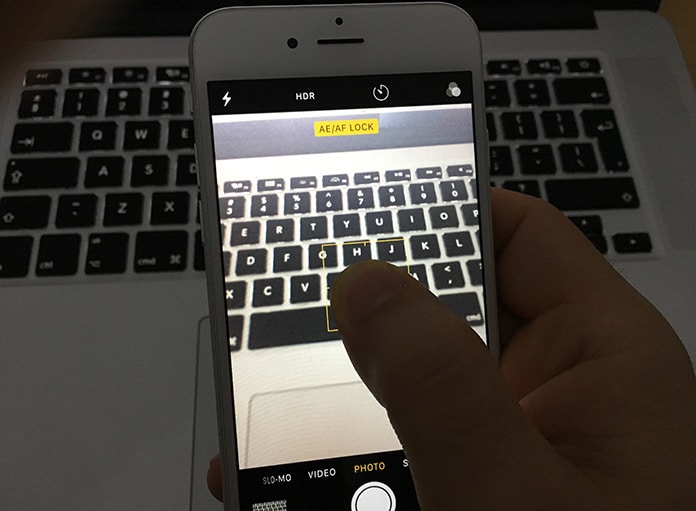
Is Your iPhone Camera Not Focusing? Here’s How You Can Fix It!

Why Is Your iPhone Camera Not Focusing?

This issue was mostly reported in the iPhone models 6 Plus, 5 or 4s. The primary reason behind this issue is the new iOS update and loose lens position.

How Can You Fix This Issue?

Here’s how you can fix an iPhone camera that is not focusing.
Fix 1: Tap your iPhone
Using the palm of your hand, touch the iPhone’s top (rear camera lens end). This fix solved the issue for many iPhone users.
Fix 2: Push and grip the iPhone camera button
Keep holding the iPhone camera button until the camera focuses. Let go of the button when an image appears clear.
Fix 3: Take off the iPhone case
Sometimes, your iPhone case keeps the camera from focusing and makes images blurry. Taking it off while you’re using camera to shoot pictures and videos will solve this issue.
Jihosoft iPhone Backup Extractor Extract and recover all types of data from iPhone backup files, such as camera roll photos, videos, SMS, contacts, reminders, WhatsApp, and etc.
Gihosoft Free iPhone Data Recovery is a professional iPhone Data Recovery software to get back all your lost text message, photo, video, call history, note, contact and more from iPhone/iPad/iPod Touch.
iphone camera wont focus

Restore iCloud Backup to iOS Device

Method 1: Restore iCloud Backup to iOS Device The second method of downloading your data and apps from iCloud is a less strategic one as it ...